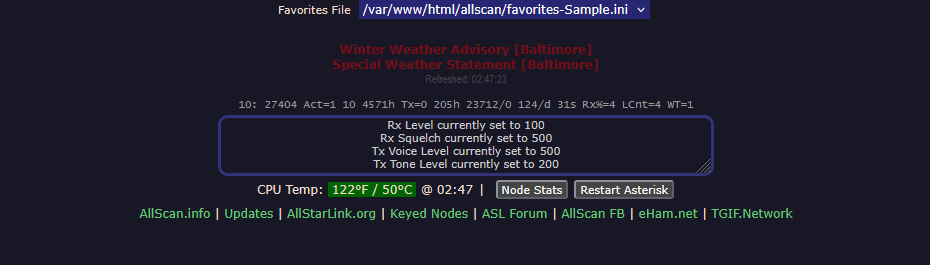
This is a way to add Skywarn Plus warnings to the allscan allstar node management webpage
Most of you are familiar with adding Skywarn Plus warnings to Supermon. I perfer allscan to supermon or the default allstar node managment.
I am not sure if this is the best way to do this but it works for me.
When an alert comes in through Skywarn Plus a text file is created in /tmp/AUTOSKY called warnings.txt. We will use this text file to print the NWS warning(s) on our allscan page. It will show the warmings in a pulsing, red, bold print – Just below the favorites section.
The code checks every 30 seconds for updates to the warnings.txt file and will update what is shown on the allscan page. If there are no warnings nothing will be shown in the warning box.
Here are the commands and files that need edited.
cd /var/www/html/allscan
cp index.php index.backup
sudo nano index.phpIn index.php add the following code to the top of the page ABOVE the <?php line.
This section will make your text pulse gently in red and will clear but hold the box area when the warnings.txt file doesn’t have an active warning.
<style>
    .warning-pulse {
        padding: 0; /* Changed to 0 so it doesn't show an empty gap */
        border-radius: 4px;
        animation: pulse-animation 2s infinite ease-in-out;
        /* THE FIX: Ensures the box exists but doesn't force a gap when empty */
        display: block;
        overflow: hidden;
        transition: all 0.3s ease; /* Makes the appearance/disappearance smooth */
    }
    /* Only add padding if there is actually content inside */
    .warning-pulse:not(:empty) {
        padding: 10px 0;
    }
    @keyframes pulse-animation {
        0% { opacity: 1; }
        50% { opacity: 0.4; }
        100% { opacity: 1; }
    }
</style>
Scroll down until you see // Show Favorites File select control. Below the line that says showFavsSelect($favsFiles, $favsFile); press enter to give yourself a new line and then paste the following.
This will access the warnings.txt file and output the text onto the allscan webpage. It also ignores / fixes the <br> that is added to the space between multiple warnings by Skywarn Plus. Each warning will be on a separate line.
// UPDATED WA3DSP with line-break support and removes timer when file is empty
echo '<div id="autosky-refresh-box" class="warning-pulse" style="color: red; font-weight: bold;">';
if (file_exists("/tmp/AUTOSKY/warnings.txt")) {
    $warnings = trim(file_get_contents("/tmp/AUTOSKY/warnings.txt"));
    if (strlen($warnings) > 0) {
        echo "<b>$warnings</b>";
    }
}
echo '</div>';
// END WA3DSP
Scroll down until you see asExit(); This will be just above all of the function statements.
Just ABOVE the asExit(); line copy and paste the following
// Refresh every 30 seconds
setInterval(refreshAutoSky, 30000);
</script>
<?php
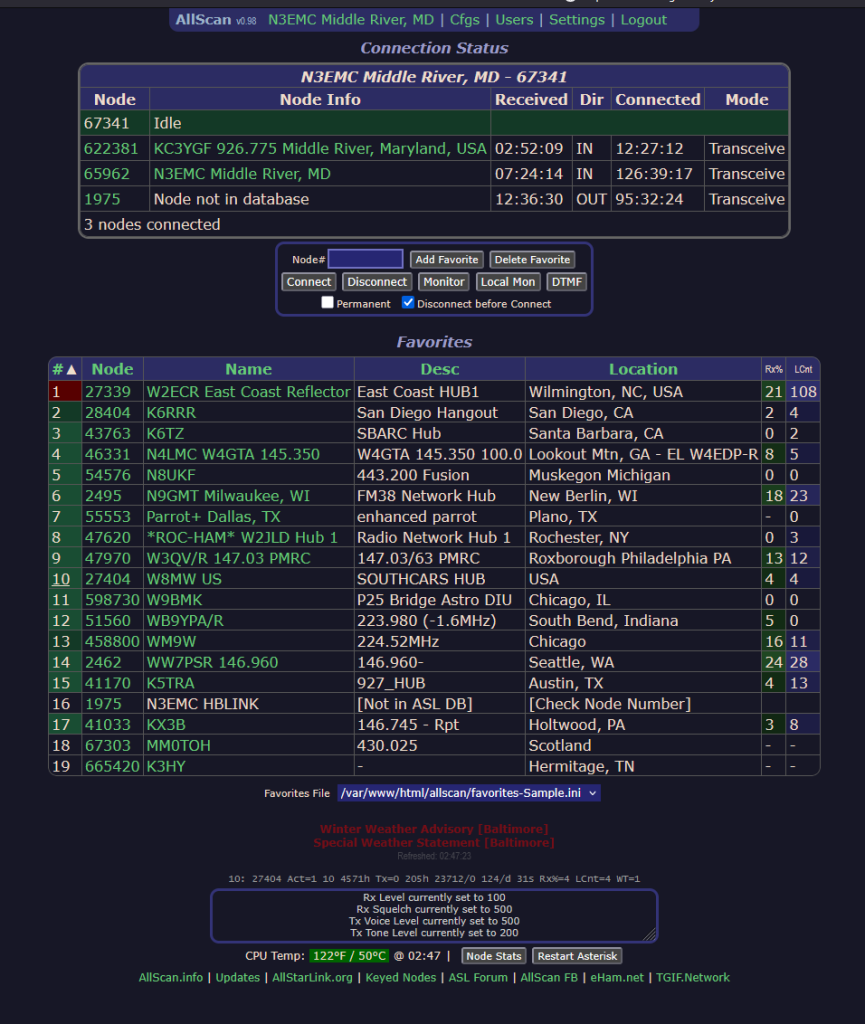
Hit control -x and y to save the file. You should be able to refresh your allscan webpage and now any active alerts will be shown at the bottom like in this example photo. The red isn’t bright in this photo but it does pulse from light to dark red and looks great in real life.
You can test it by setting the test injections setting in Skywarn Plus’s config file to true to trigger the test conditions.
When an alert ends it might take a minute or two to clear the warnings.txt file but it should clear on it’s own with no input needed on your end.
You can go all in on this and set it to flash your browser tab, send a pop up, or play a sound when an alert comes in. In addition you can change the background color or text color for different levels of alerts. Like yellow for advisory and red for warning and so on. It’s really up to you.
If you ran the cp index.php command you should have a backup saved in case something goes horribly wrong. Just delete index.php and then rename index.backup to index.php.
 English